You updated your meta title or description in RankAl SEO, saved the page, checked your site — and the change is there. But Google is still showing the old version in search results. Days later, still the same. Here’s why this happens, what you can actually control, and how to speed it up.
First — check that your change actually saved
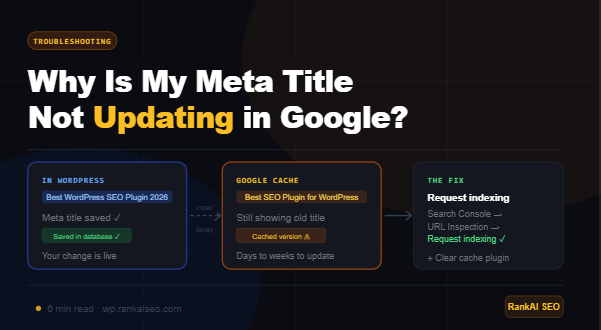
Before assuming Google is the problem, confirm the change is really live on your site. Open the page in a private/incognito browser window (to avoid cache) and view the page source with Ctrl+U (Windows) or Cmd+U (Mac). Search for og:title or <title> in the source.
If you see the old meta title there, the change didn’t save correctly. Go back to WordPress, edit the post, scroll to the RankAl SEO meta box, update the title, and click Update on the post. Then check the source again.
If the new title is already in the page source — your site is correct. The issue is entirely on Google’s side, and the rest of this guide explains what to do.
Why Google shows the old meta title or description
Google doesn’t read your site in real time. It crawls pages periodically, caches what it finds, and displays that cached version in search results. When you change your meta title or description, Google needs to re-crawl the page and update its index before the new version appears in search.
How long that takes depends on several factors:
- Crawl frequency: Google crawls popular, frequently-updated sites more often than low-traffic or rarely-updated ones. A site with daily new content might get crawled multiple times a day. A static site might get crawled every few weeks.
- Page importance: Your homepage gets crawled more often than a deep archive page
- Domain age and authority: Newer domains get crawled less frequently
- Server response time: Slow sites get crawled less
In most cases, meta changes propagate within a few days to two weeks. There’s no way to force an immediate update — but there are ways to significantly speed it up.
How to speed up the update
1. Request indexing in Google Search Console
This is the most effective thing you can do. Google Search Console lets you submit a specific URL for priority crawling:
- Go to Google Search Console
- Paste the full URL of the page you updated into the search bar at the top
- Click Request indexing
- Wait — Google will prioritise this URL in its crawl queue
After requesting indexing, most pages update in search results within 24–72 hours. This won’t guarantee an immediate update but it’s the fastest legitimate method available.
2. Clear your caching plugin
If you have a caching plugin (WP Rocket, LiteSpeed Cache, W3 Total Cache, etc.), it may be serving a cached version of the page with the old meta tags — even if your WordPress database has the new values.
After saving any meta changes in RankAl SEO, always clear your cache:
- WP Rocket: Dashboard → WP Rocket → Clear cache
- LiteSpeed Cache: LiteSpeed Cache → Purge All
- W3 Total Cache: Performance → Purge All Caches
- Cloudflare: Cloudflare dashboard → Caching → Purge Everything
After clearing, visit the page in incognito mode and check the source to confirm the new meta tags are live.
3. Submit your sitemap
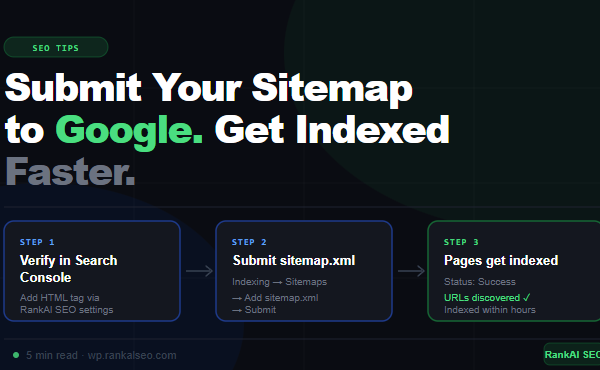
If your sitemap is submitted to Google Search Console, Google will pick up changes faster because it knows which pages to prioritise. If you haven’t submitted it yet, go to Search Console → Sitemaps → add sitemap.xml. See our full guide on submitting sitemaps to Google.
A common confusion — Google sometimes ignores your meta title
Here’s something important that many site owners don’t know: Google doesn’t always use the meta title you set. Google may rewrite your title in search results if it decides its own version is better for the user’s query.
This happens when:
- Your title is too long (over ~60 characters)
- Your title is too short or doesn’t describe the page well
- Your title is the same as the H1 heading but Google prefers something from the page content
- Your title is stuffed with keywords and looks unnatural
- The page’s visible content doesn’t match the meta title
Google’s title rewrites are not a bug — they’re intentional. The only way to reduce them is to write meta titles that accurately, concisely describe the page content (under 60 characters, natural language, matching the page’s H1).
How to check if Google is rewriting your title
In Google Search Console go to Search results and filter by the page URL. Compare the impressions data with what’s actually showing in Google — or simply search site:yourdomain.com/page-slug in Google to see exactly what title and description it’s displaying.
Google also rewrites meta descriptions
Meta descriptions are rewritten by Google far more often than titles. Studies consistently show Google ignores the provided meta description in over 60% of cases, instead generating a snippet dynamically from the page content that it thinks best matches the user’s query.
This isn’t something you can override — Google decides what snippet to show based on the search query. A user searching “how to install RankAl SEO” will see a different snippet than someone searching “RankAl SEO pricing,” even on the same page.
That said, a well-written meta description still matters:
- Google uses it when it can’t find a better snippet from the page content
- It influences click-through rate when Google does use it
- It’s good practice and sets the expected tone for the page
Keep meta descriptions between 120–158 characters, write them like a human (not a keyword list), and make sure they accurately summarise the page.
Check for a noindex tag
If your page isn’t appearing in Google at all — not just showing old meta tags — check for an accidental noindex directive. In RankAl SEO, open the post editor, scroll to the RankAl SEO meta box, and look at the Advanced tab. Make sure Allow search engines to show this page in search results is enabled (not set to noindex).
You can also check in Google Search Console using the URL Inspection tool — it will explicitly tell you if Google is blocked from indexing the page.
Check for a canonical pointing elsewhere
If your page has a canonical tag pointing to a different URL, Google treats the canonical as the “real” page and may not index your page at all, or may show the meta tags from the canonical destination. In RankAl SEO, the canonical is set automatically to the correct URL — but if you’ve manually overridden it, or if another plugin is setting a different canonical, it can cause issues.
Check the page source for <link rel="canonical"> and verify it points to the exact URL of your page.
The Open Graph title vs the meta title
One more source of confusion: your meta title (for Google search results) and your Open Graph title (for social sharing previews on Twitter, LinkedIn, Facebook) are separate. RankAl SEO lets you set them independently.
If your title looks correct in Google but wrong when someone shares the link on social media — or vice versa — the issue is in the Open Graph settings. In the RankAl SEO meta box, check the Social tab and update the OG title separately.
Also note: social platforms cache their own previews. Facebook in particular can cache OG data for days. Use the Facebook Sharing Debugger to force a refresh of the cached preview.
Summary — what to do right now
- Check the page source in incognito — confirm the new meta title is actually live
- Clear your caching plugin if the change isn’t showing in source
- Request indexing in Google Search Console for that specific URL
- Wait up to two weeks — Google’s crawl schedule is not instant
- Check if Google is rewriting your title — keep titles under 60 characters and accurate
- Check for noindex or wrong canonical if the page isn’t appearing at all
- For social sharing, use the Facebook Debugger or LinkedIn Post Inspector to force a preview refresh
If you’ve done all of the above and something still seems wrong, open a support ticket (PRO users) with the URL and a screenshot of the Search Console URL Inspection result — we’ll dig in.
RankAl SEO PRO gives you unlimited AI content generation, daily rank tracking, full-site audits, and WooCommerce SEO — all inside WordPress. From €8.99/month.